If you write software with AI, you probably already use more than one agent. One is better at the tricky refactor, another is cheaper for the boring migration, and a third came free with a subscription you already pay for. The trouble is that each lives in its own window with its own history, and moving a task between them means copying and pasting.
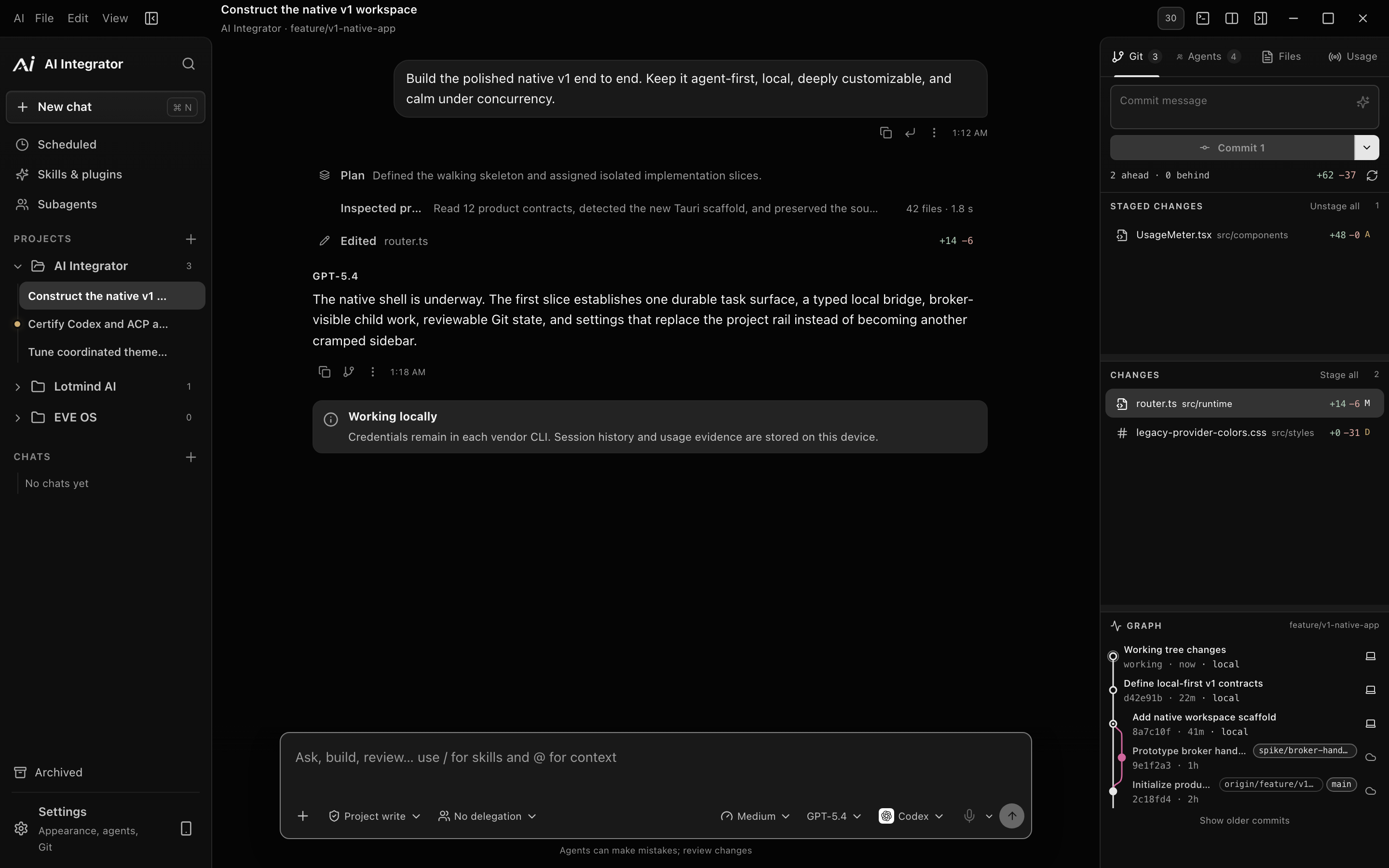
AI Integrator Code is a workspace on your computer for the coding agents you already have. You open a project, give a task to an agent, and watch it work. When it is done you review what changed in the same place, and decide whether to commit it.
Your agents, your accounts
Code does not replace your agents. It runs the ones installed on your computer: Codex, Claude Code, Cursor, and others, including any agent that speaks the Agent Client Protocol. Each keeps its own sign-in, its own models and its own limits. AI Integrator does not read their credential files, and nothing about your code passes through an AI Integrator server. Your repositories, your tasks and your transcripts stay on your computer.
In one task you choose the agent, the model, and how hard it should think. You can change any of them later in the same task, and the next agent picks up where the last one stopped.
You decide how much it can do
Every task has a permission level, and it sits in the message box where you can see it:
- Read only. The agent can look but not touch.
- Project write. It can change files in the project and nothing else.
- Ask as needed. It asks before it does anything that needs your approval.
- Auto. A second model reviews only the actions that leave the project: shell commands, network calls, files outside the folder, and tool calls. Everything else goes ahead.
- Full access. No questions.
Auto is the one to be careful with: it is a filter, not a sandbox. The reviewer's instructions deny sending secrets out, reading credentials, weakening security settings, force-pushing a main branch and running code that has not been pinned. If no reviewer answers in time (ten seconds, by default), a setting decides what happens, and the choices are Ask me or Deny. It never quietly says yes.
Let one agent ask another
With delegation turned on, a lead agent can hand a focused job to another one: look into this, read that, write these tests. Each helper shows up under the Agents tab and as a tab of its own. You choose how eager the lead should be, from No delegation to Balanced delegation to Budget first.
Helpers can read all at once, but only one of them can edit the project at a time. And when a helper finishes, it does not stage, commit or push anything. Its work waits for your review.
Review first, then commit, then push
Changes open in a unified diff next to the conversation. The Git tab lists what is staged and what is not, and can draft a commit message for you. Commit and Push are separate buttons on purpose: committing happens on your computer and pushing sends it somewhere else, and you may want to look in between.
- An agent edits files
- You review the diff
- Commit. On your computer
- Push. Somewhere else
- An agent edits files to You review the diff
- You review the diff to Commit
- Commit to Push
A browser the agent shares with you
A task can open a browser tab right beside its files and diffs. It is a real web page, so sign-in and cookies work. When an agent uses it, you see a labelled cursor move across the page, so you know what it is clicking before it clicks.
A few rules keep it from getting out of hand. A task's tabs belong to that task, and an agent that is driving a tab holds it for 45 seconds so two agents do not fight over one page. If a site needs a login, you can save it once, and the saved login goes into your operating system's credential store. When an agent asks to use it, a prompt names the site and offers Not now, Just this once and Always here. The agent never sees the password.
You can also point at things. Annotate this page lets you pick an element and sends it to the chat as an attachment, which is easier than describing a button in words.
Work that runs while you are away
Scheduled tasks run a prompt later, or over and over. A task called "Check CI again" might run every half hour, with only the tools it needs, and continue in the same chat each time. It can leave a note for its next run, so it builds on what it found before.
The scheduler lives in the desktop app, so the app has to be open for a run to start. A run that was missed while you were away happens once when you come back, not once for every missed hour.
What it does not do yet
Usage history in Code covers Codex and Claude Code, and the numbers are API-price estimates, not what you were billed. Other agents point you to their own usage pages. A helper agent works in the same folder as its lead, so for now one editor at a time is the rule. And AI Integrator Code runs on Windows and macOS.