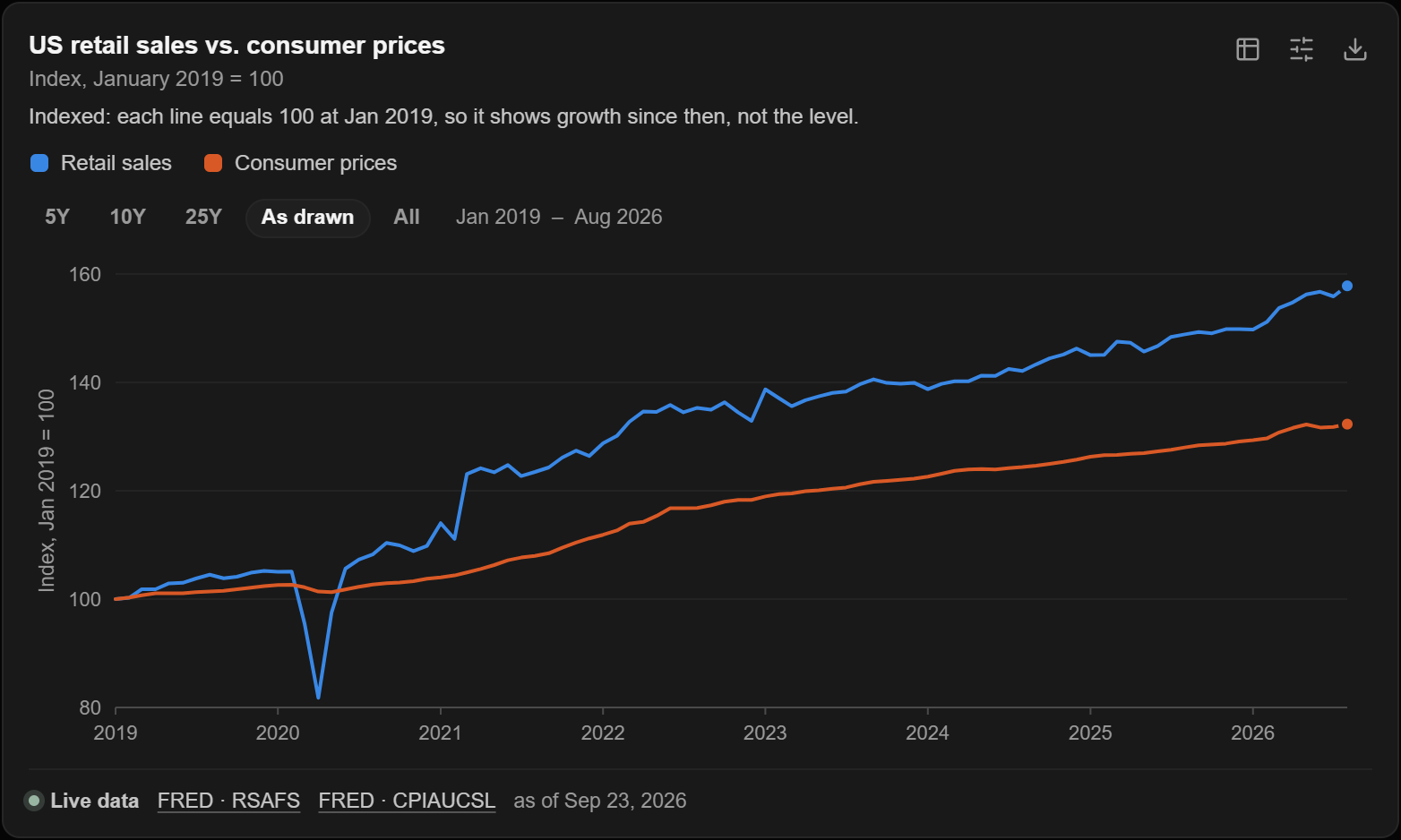
Ask a question about numbers, and the answer is often better as a picture. Chat can now draw one. Ask it to chart US retail sales against consumer prices since 2019, and it fetches both series, puts them on one chart, and tells you where the numbers came from.
Ask, and it draws
You do not choose a chart type or fill in a form. Describe what you want to see, and the model picks the chart: a line or an area over time, bars (side by side, stacked, to 100 percent, or horizontal), a pie or a donut, or a scatter of labelled points. It can draw up to eight series at once. The chart appears inside the reply, where the answer refers to it, and not only in a row of tool calls above it.
It tells you where the numbers came from
Every chart has a line under it saying how much to trust it. Live data means the numbers were fetched from a source, and the line names the publisher and the date they are current to. In the chart above, that is the Federal Reserve Bank of St. Louis's FRED, and the line gives the two series it used. Partly live means some did and some did not. Model-supplied values means the numbers came from the conversation, from what you pasted or what the model knew, and the chart says so plainly.
This matters most when a chart looks convincing. A tidy line is not evidence, so each chart is labelled to show which ones are.
Change it without spending another turn
Once a chart is on the screen, you can reshape it from the chart itself:
- Type. Switch between line, bars and the rest. The switcher only offers types that keep the chart honest, so a list of unrelated categories never turns into a trend line.
- Time range. Show the last 5, 10 or 25 years, everything, or the chart as it was drawn.
- Scale. Use a log scale when values differ by orders of magnitude.
- Compare. Show lines indexed to 100 at a starting date, as percent change, or year over year. That is how the retail sales chart above can put a number of dollars and a price index on the same footing.
- Stacking. Put series side by side, stacked, or stacked to 100 percent.
Show as table opens the data behind the chart. You can save a chart as PNG, SVG or CSV, copy the image straight to the clipboard, or press Refresh data to pull the latest values from the sources. Click a bar or a slice, and you can ask about that point.
Compare things, not just time
A line shows change over time. Plenty of questions are not about time. Which model is cheapest for the quality you need? Which company earns the most for each dollar it spends? For those, the model draws a scatter of labelled points.
The points can be coloured by group and sized by a third number. The chart can draw a dashed line through the best options, the ones no other point beats on both measures, and shade the corner worth aiming for. Cost can use a log scale so that cheap and expensive options are both readable. A chart can also show a calculated result, such as a margin or free cash flow, and still cite and refresh the sources it was calculated from.
Some options are locked when they would mislead. A chart that compares categories will not offer to join them with a line.
Where live data comes from
Data comes from plugins in Skills & Plugins, which are off until you turn them on.
| Plugin | What it can fetch |
|---|---|
| AI Integrator Government | Congress.gov, GovInfo, the Federal Register, OpenFEC, USAspending, and federal data such as FRED, BLS, Census, EIA, Treasury Fiscal Data, SEC EDGAR and BEA |
| AI Integrator Finance | FRED, BLS, EIA, SEC EDGAR, Treasury, BEA, CFTC Commitments of Traders, FDIC BankFind and World Bank |
| Yahoo Finance, Stooq | Price history |
| Alpha Vantage | Market data, using your own key |
| Artificial Analysis | Model benchmarks and list prices |
What it will not do
Price history is history, not a live quote, and nothing here is investment advice. Artificial Analysis gives price per million tokens, which is not the same as what a task costs, and a chart that uses it says so. Some sources limit how far back they go without a key: BLS history is ten years, for example. A chart keeps up to 1,200 points.