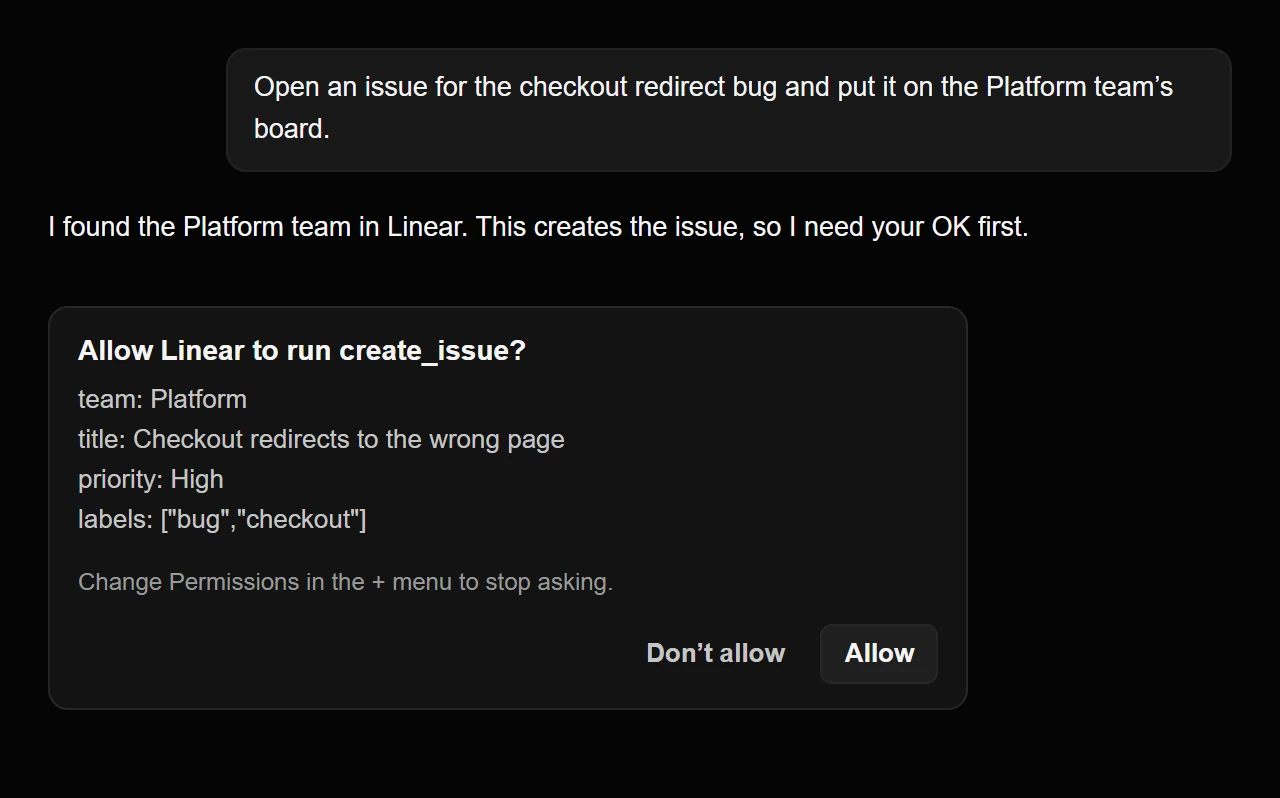
Chat and Code now ask before a plugin changes something. When a model wants to create an issue in Linear, open a pull request on GitHub or redeploy a project in Vercel, a card shows the plugin, the action and its inputs, and the model waits for your answer. Looking things up never asks. You choose how much to approve yourself, from Read Only to Bypass Permissions, and the choices are the same in Chat and Code.
Models also reach plugins in a new way. Instead of loading every tool from every plugin into the conversation, Chat and Code give the model two tools, one that searches a plugin's tools and one that calls a tool. Every tool a plugin offers is still reachable, and a plugin with hundreds of tools no longer fills the model's context before you have asked for anything. In Code, AI Integrator starts a plugin's server when a chat first uses it and stops the server when it goes idle. This works the same for Codex, Claude Code, Grok, Cursor, OpenCode and Antigravity.
Reads and changes
Before a plugin tool runs, AI Integrator decides whether it only reads or may change something. The plugin's own hints decide first: a tool marked read-only is a read, and a tool marked destructive is a change. When the plugin gives no hint, the first word of the tool's name decides. Names that start with get, list, search, find, fetch, read and similar words count as reads. Any other name, and any tool the plugin didn't list, counts as a change. The rule leans toward asking, so you will sometimes see a card for something harmless.
- A model calls a plugin tool
- Does it change something?
- Your Permissions
- The decision model judges
- You allow or decline
- The tool runs
- The tool doesn't run
- A model calls a plugin tool to Does it change something?
- Does it change something? to The tool runs: No
- Does it change something? to Your Permissions: Yes
- Your Permissions to The tool doesn't run: Read Only
- Your Permissions to You allow or decline: Ask First
- Your Permissions to The decision model judges: Auto
- Your Permissions to The tool runs: Bypass Permissions
- The decision model judges to The tool runs: Clear yes
- The decision model judges to You allow or decline: Anything else
- You allow or decline to The tool runs: Allow
- You allow or decline to The tool doesn't run: Don't allow
Permissions
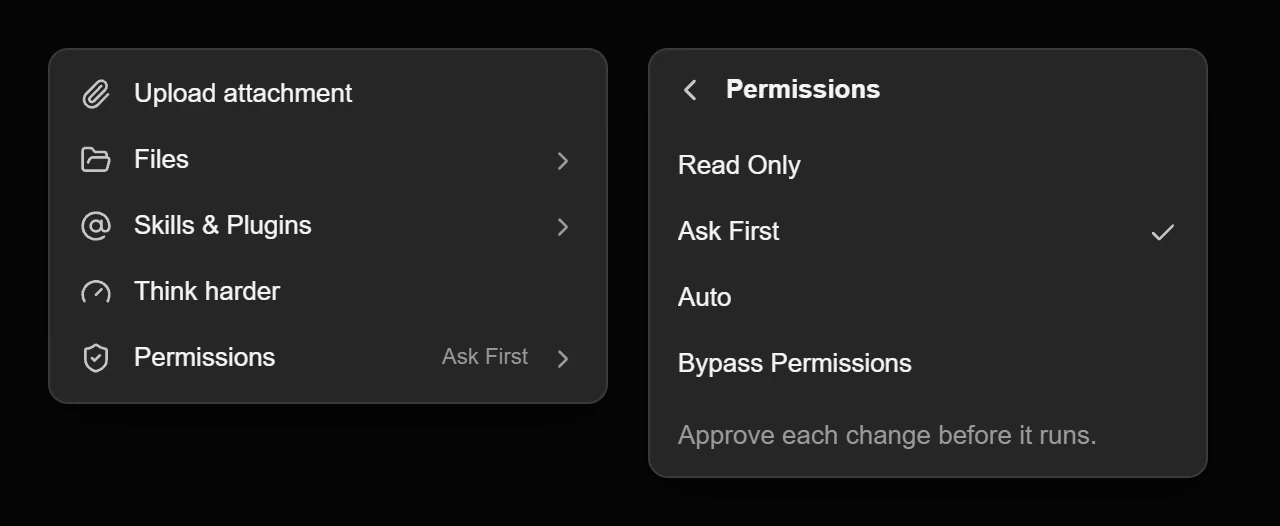
Permissions decide what happens to a change:
- Read Only: plugins can look but not change anything. A change is refused, and the model is told why.
- Ask First: a card appears for each change. This is the default.
- Auto: the decision model judges the change. Routine changes you asked for run, and anything else asks.
- Bypass Permissions: changes run without asking.
To choose, open the + menu in the composer and pick Permissions. It works the same on the web, in the desktop app and on iPhone, and the choice applies to your whole account. Code uses the same names and adds Edit Files, for chats that may change files in the project.
A scheduled task can have its own Permissions or follow your account's. When a model sets up a task itself, it can choose Read Only or Ask First for it, and never Auto or Bypass Permissions. If a change would ask but no chat is open to ask in, the call doesn't run, and the model is told why.
The approval card
The card reads "Allow Linear to run create_issue?" and lists the inputs one per line, up to six, so you can see what will change. Allow runs the call. Don't allow skips it, and the model carries on with whichever you chose. Any device that shows the chat can answer, and the first answer counts. Only the newest reply's card can be answered.
When an Agent is waiting on a change, its Home chat shows an approval row after the reply, and your devices get a notification. Tapping it opens that Agent's Home.
On a voice call, the card appears on the call screen and waits up to 90 seconds. Only a tap answers it. Saying yes out loud doesn't count, so a voice can't approve a change on its own.
Auto
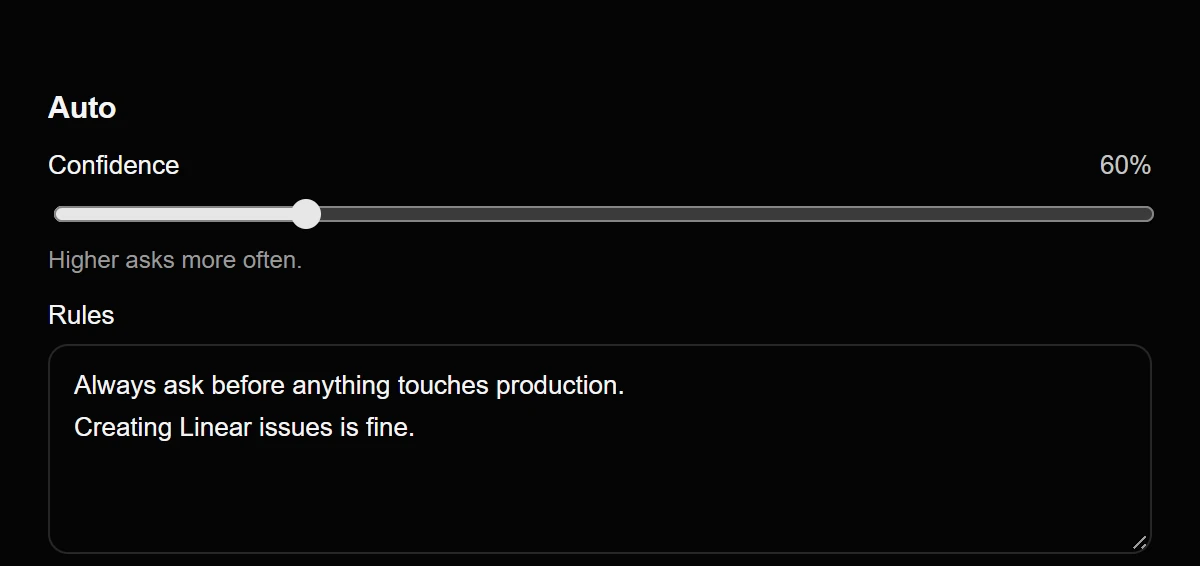
Auto asks the decision model, the small, fast model you pick in Settings under Runtimes & Models, one question about each change: should this run without asking? The model sees your request, the plugin and tool, the inputs and your Auto rules. A change runs only when the model is at least 60% sure that it should. Below that, or when the model can't answer in time, you get the card.
Two settings under Auto shape the answer. Confidence sets the bar between 50% and 95%, and a higher bar asks more often. Rules takes plain sentences, such as "Always ask before anything touches production. Creating Linear issues is fine." The model reads them with every change.
Auto is not a security boundary. The decision model can approve something you would have declined. In AI Integrator's own test, four decision models each judged 23 changes that should always ask, and none approved one. That is a small sample, so use Ask First for anything you can't undo.
Code's Auto uses the same decision model. When Auto has to decide whether an action may cross the workspace boundary, the decision model answers by default, whichever runtime the chat uses. The older language-model reviewers are still available in Settings under Permissions.
Changes that always ask
Some changes ask in every mode, Bypass Permissions included, because they can move money. Every change in Stripe and Robinhood asks, and so do domain purchases and transfers in Vercel.
More plugins
Add MCP server, in Skills & Plugins, takes the address of a server or a config block copied from its README, on the web, in the desktop app and on iPhone. AI Integrator works out whether the server needs no sign-in, OAuth or an API key. The address is stored encrypted because it can contain a key, and a server whose address or header holds a key stays in Chat.
Four legal research plugins are new: Bloomberg Law, CourtListener, Descrybe and Paxton. The Government data plugin has 11 more sources, among them National Weather Service alerts, openFDA, NHTSA vehicle recalls and USGS earthquakes, and now covers 26 in all. The Google Drive, Box, Docusign, Figma and HubSpot plugins were removed from the list. Everything else in that release is in 0.3.1: Artifacts & AI Integrator in Code.